Showing posts with label Salesforce. Show all posts

Thursday, 12 November 2020

[#Blogged] - Salesforce Winter ’21 Release Notes Summary

 It’s here! The Winter ‘21 Release Notes are here, that is! In this crazy year of remote work, Salesforce has managed to bring us rays of joy in their releases, even if that means they don’t happen exactly on the dates we’d all hoped for. Just like I did in the Summer ‘20 release, I’ve gone through the notes to bring you headlines from the upcoming Winter release, so you can take time to plan out and schedule how you’d like to dive in. Below, you will find a long list of features, segmented by general topic. Keep in mind, this is intended for you to read through in the short amount of time you may have, so you can get a glimpse of what’s included, and take note of features you’d like to investigate further, as you have time.  The bullet points and images included are courtesy of the Salesforce Winter ‘21 Release.


General Changes


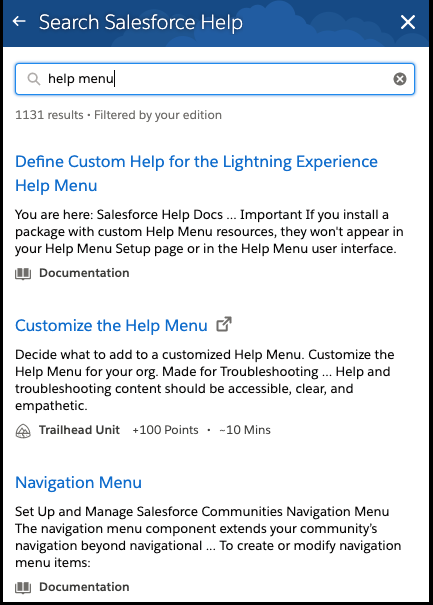
As usual, Salesforce does include a “general changes” section, which encompasses those that don’t pertain to just one cloud. They’re now offering one place to drive your multi-factor authentication implementation, and a new release for Salesforce Anywhere (as of September). You can also search for Trailhead documentation in the help menu! Take a look at some of the other great general changes being made in this release.

  • Drive Your Multi-Factor Authentication Implementation from One Place

  • Smarter Natural Language Searches (Beta)

  • Salesforce Anywhere: Plan and Accelerate Your Business in Real Time (Beta)

  • Add Custom Theme Colors to In-App Guidance

  • Search Trailhead from the Help Menu (pictured above)

  • Display Survey Pages Based on Your Data

  • Check Resource Availability Directly from External Calendars

  • Interactively Create Engaging Email Templates


Sales


Salesforce included a good handful of updates for High-Velocity Sales, and I know we’re all celebrating the new, larger email deliverability size! There are also changes to Einstein Opportunity Scoring and it is now easier to assign a territory in Enterprise Territory Management. Check out the Sales Cloud changes below!

  • Amp Up Sales Cloud with Voice

  • Control Who Can Access Sales Cadences (High Velocity Sales)

  • Stay Focused with Session-Long Work Queue Filters (High Velocity Sales)

  • Choose Which Number to Dial for Click-to-Call (High Velocity Sales)

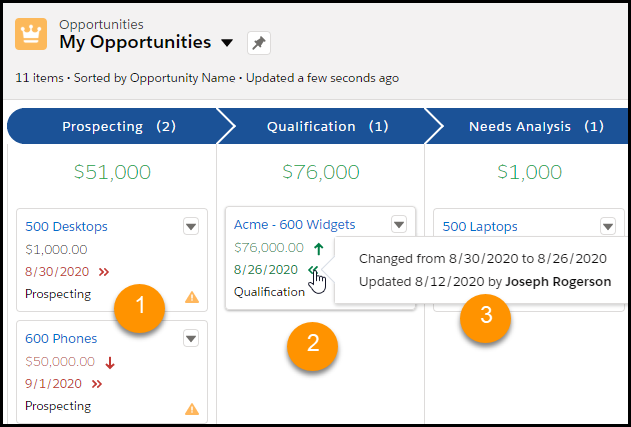
  • Find Changed Deals at a Glance (pictured above)

  • Enjoy Improvements to Einstein Opportunity Scoring

  • Get Forecasts on the Go

  • Update Opportunity Stages on the Forecasts Page in Lightning Experience

  • Enterprise Territory Management: Assign a Territory to a New Opportunity in Fewer Steps

  • Einstein Activity Capture: New Connection Options, More Control Over How Data Flows, and a New Email Insight

  • Easily Coordinate When to Meet with Insert Availability in Lightning Experience

  • Create Larger Emails with New Maximum Size of 35 MB

  • Streamline Contacts and Leads with Default Bounce Alerts


Einstein


I’ve decided to break up the Einstein changes into functionality vs. analytics. This section takes a look at the plethora of changes that are happening in Einstein. Don’t let the limited number of bullet points fool you - there are multiple changes across multiple clouds. You can use Einstein Recommendation Builder to deliver personalized recommendations, and utilize the natural language search improvements. Really take some time to dive into these awesome features - you’ll be glad you did!
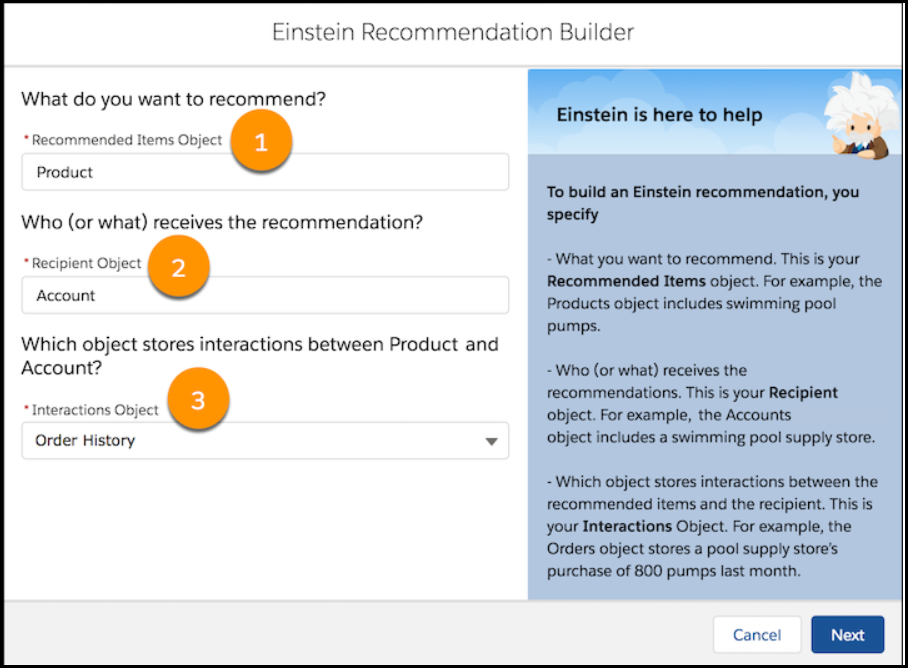
Populate the Recommended Items Object (1), the Recipient Object (2) and the Interactions Object (3) to utilize the Einstein Recommendation Builder.


  • Sales Cloud Einstein: More Control of the Opportunity Scoring Model, Global Models for Lead Scoring, and Big Improvements to Einstein Activity Capture

  • Einstein Discovery: Custom Improvements Text, Predict Outcomes in Process Automation Formulas, High Cardinality

  • Einstein Bots: Everyone Can Bot with Intro Template, Intent Model Enhancements, and New Permissions

  • Einstein Builders: Deliver Personalized Recommendations (Beta), and Show Confidence Range and Top Predictors on Records for Numeric Predictions

  • Einstein Vision and Language: Image Recognition and Natural Language Processing

  • Einstein Search: Personalization (Generally Available), Easier Setup at the Org Level, Smarter Natural Language Searches (Beta), and Searchable Renamed Objects Using Natural Language Search


Reporting & Einstein Analytics

Although there was not a long list of reporting changes to standard reporting, the one they did release is a big one: you can now automatically add custom fields to custom report types! Whohoo! The Einstein Analytics release changes aren’t too shabby, either - a lot of Beta and Pilot features in this one, including reusable dashboard components, and utilizing your local timezone for your insights. Check these out now!


  • Avoid Stale Salesforce Data in Snowflake with Sync Out (Beta)

  • Build Calculated Formula Columns with More Functions in Data Prep

  • Calculate Dates with Click-Not-Code Date and Time Transformations

  • Quickly Calculate Statistics with Aggregate Functions

  • Freeze Some Table Columns, Scroll Through the Rest

  • Expand or Collapse Grouped Columns Faster

  • Add Accuracy to Your Insights with Date and Time Data in Your Local Time Zone (Beta)

  • Protect Data in Embedded Dashboards with Locked or Hidden Filters

  • Save Time Creating and Managing Dashboards with Reusable Dashboard Components (Pilot)

  • Embed Predictions in Your Dataset During Data Prep (Pilot)

  • Implement External Models in Your Salesforce Org (Pilot)

  • Build Accurate Models Using Random Forest Algorithms (Pilot)

  • Jump-Start Story Creation Using Templates

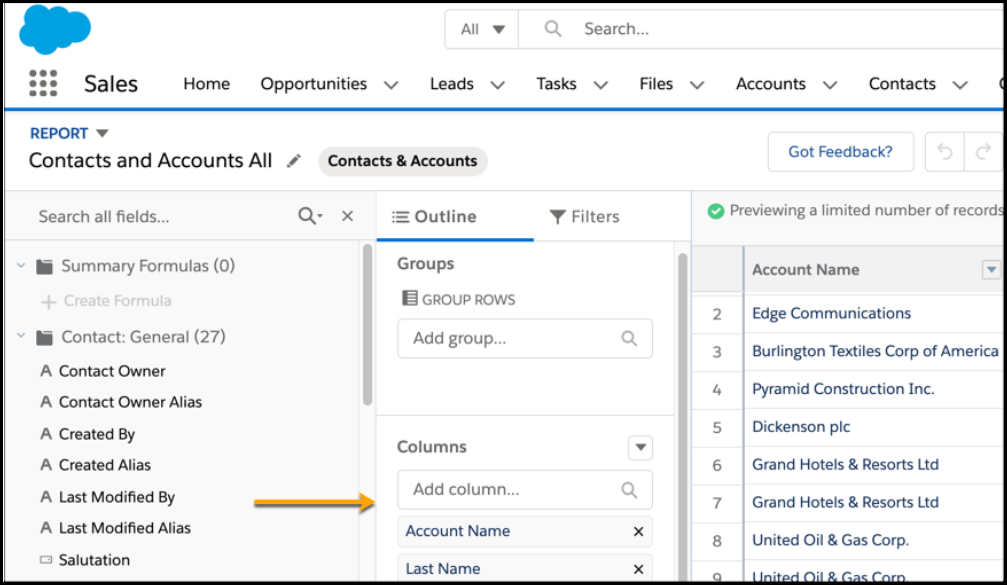
  • Auto add fields to Custom Reports Types (Beta) (pictured above)


Services


Just like with Sales Cloud, the Winter Release offers a lot in the way of Service Cloud, as well, for 2021. There is now a faster way to set up the Service Console, and they are now offering (drumroll, please…) a Microsoft Teams integration! Another amazing platform to keep your team connected! I was really impressed with some of the features in Service Cloud for this release, but don’t just take my word for it!
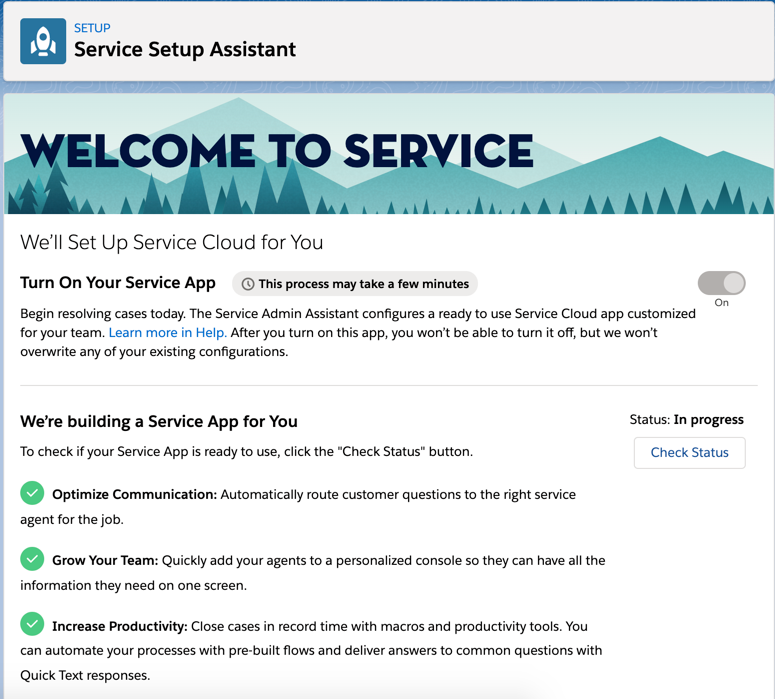


  • Service Setup Assistant: Go from Zero to Console in Minutes (pictured above)

  • Spend Less Time Setting Up Voice with Improved Setup

  • Kick Off Lightning Flows, Processes, and Workflows Based on Voice Call Records

  • Work More Efficiently on Voice Call Records with Macros and Quick Actions

  • Transfer Callers to the Right Agent with a More Intuitive User Interface

  • Get Warnings to Avoid Ending Calls Accidentally

  • Facilitate Training with Service Cloud Voice Transcript Monitoring

  • Dial Phone Extensions with the Built-In Keypad

  • Streamline Bot Responses for Screen Readers

  • Knowledge Enhancements for Channels (Including Voice)

  • Use Omni-Channel Skills-Based Routing Rules to Route Chats and Messages to Agents with the Right Skills

  • Monitor Service Cloud Voice Transcripts in Omni-Channel Supervisor

  • Microsoft Teams Integration: Bring Salesforce and Microsoft Teams Together for Service Reps (Pilot)

  • Improve Agent Interactions with Prebuilt Flows


Communities

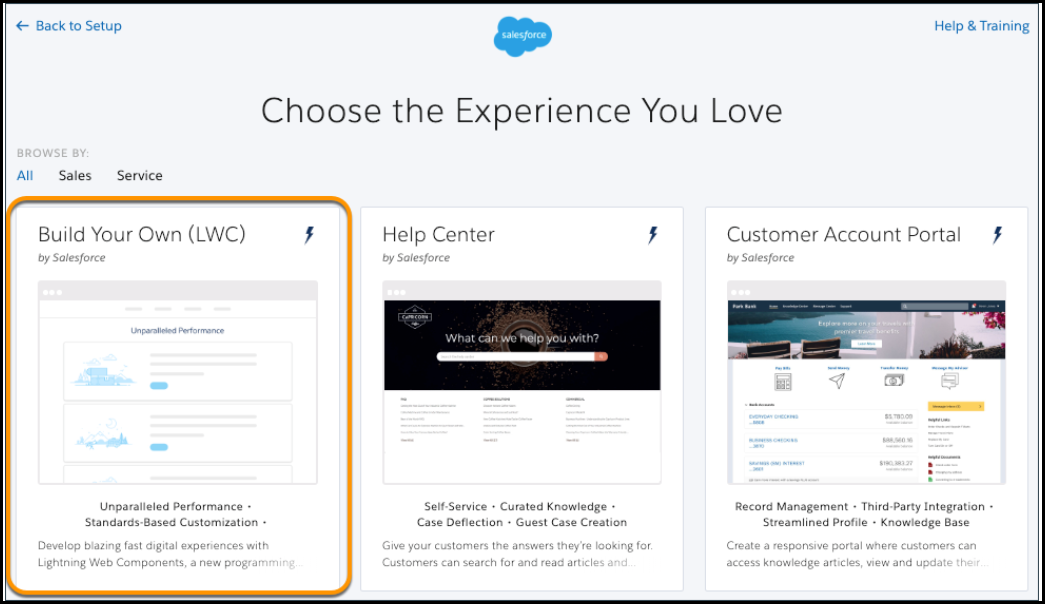
The Community Cloud brings forth a really awesome Build Your Own (LWC) template option in pilot mode for the Winter ‘21 release this year, and as they’re always on top of Guest user abilities, allow you to reduce object permissions, and allow users to authenticate via SMS. Learn more below!

  • Manage Your Pages and URLs with the Pages Menu

  • Apply Audiences to Record Detail Pages with Record-Based Criteria

  • Print Lightning Community Record Details and Lists with Printable View

  • Build Fast, Efficient Experiences with the LWC-Based Template (Pilot) (pictured above)

  • Reduce Object Permissions for Guest Users

  • Let Users Authenticate by SMS

  • Customize Notifications for Changing Email Addresses

  • Enable Article Sharing for High-Volume Community Users


Field Service

Wait, shouldn’t this be called “Field Service Lightning”? Nope! As part of the Winter ‘21 release, Salesforce has changed the name to be more succinct and efficient. But, that doesn’t mean they left out any great features. Field Service is still the great tool you’ve come to know and love, and with this release, you might even love it just a little bit more.

  • Record Product Warranties

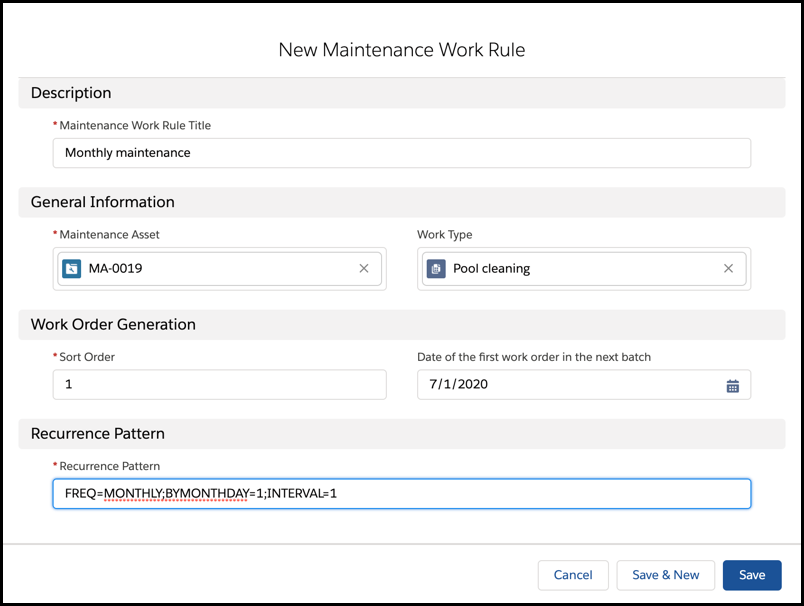
  • Improve Preventive Maintenance with Advanced Recurrence (Beta) (pictured above)

  • Get the Total Price on Service Contract Line Items

  • Target Work Priorities Using Service Appointments

  • Shape Up with New Tests in Health Check

  • Send Meaningful Messages Using Custom Notifications

  • Never Miss a Message in Notifications


That wraps it up for Winter ‘21! As you know, there are a lot of other features that are still great, but I just wasn’t able to fit it all in! I look forward to taking advantage of all that Winter ‘21 has to offer soon, and know you’ll be right there with me! 


Thursday, 4 June 2020

[#Blogged] - Dynamic Forms & Actions

The great thing about Salesforce is how customizable it can be. If you’ve had your Salesforce org for a while, chances are you have a ton of customization, including specific object fields to capture unique data for your business. Fields are quick and easy to set up and add onto a page layout, but that can lead to a problem or two. Once your Sales or Services department realizes how simple it is to add “just one more field”, you can really rack up a lot. Hopefully, not every field ever created is on the page layout, however, it may be safe to bet they are! While fields are used to capture and display data, not all of them are used for data entry, and not required to be visible all of the time.

If you have departments that demand to see these fields constantly, you can run into headaches of never ending page scrolls. Your nice and neat custom page layout can turn into a long laundry list of data that overwhelms your senses. The next thing you know, one department is complaining about seeing fields requested by another, and how difficult the page can be to use. Unfortunately, that can lead to a lack of user adoption, and make it more frustrating to find the data you really need. And, thus, in the end, the fields you’ve created and displayed aren’t getting utilized for their original purpose.  

Where this really becomes a problem is when you have numerous departments, or roles, that each need to see different information, and thus separate page layouts. The next thing you know, you’re sorting through 5 or 6 page layouts, adjusting that custom object for your sales, services, finance, and every other department that needs to see it. Not only is that an extreme waste of time for you, but opens you up for possibly forgetting to make an adjustment on one of the layouts, leaving those that depend on you without the data they need. 

The great news is, it doesn’t have to be this way! What if I told you Salesforce has produced a solution for Lightning App Builder that can help save you time, and reduce some of those headaches? 

Let’s talk about Dynamic Forms and Dynamic Actions!

What Are Dynamic Forms?

Glad you asked! Dynamic Forms are a new feature of the Lightning App Builder for creating Record Pages to be used on Custom Objects (for now). You can now use sections as you always have with components, but now you can choose Fields, as well (see below). Instead of being limited to the page layout editor, you can drag and drop fields, using the design of your choice.  

How Can Dynamic Forms Help Me?  

Dynamic Forms have a lot to offer in a small package. Not only do they allow more versatility than adjusting layouts before, but they actually allow for better page performance. As you may have noticed, those page layouts with a hundred or so fields can load somewhat slowly. Tabs and Accordion components allow for a more efficient space and load time, since sections can be compressed and expanded. You also have Field Visibility Rules, which provide filters to help control which data is visible based on certain criteria. This is similar to Component Visibility Rules, which reduces the number of page layouts you need, since that can also be controlled by criteria that limits what can be seen. Although the page layout editor typically used to adjust page layouts also allows drag and drop, the size of the Lightning App Builder allows the page to come together as a whole, instead of one long page. The layout management here is just much easier to use. 

Are Dynamic Forms Easy to Use?  

Speaking of easy to use, it’s absolutely a breeze. Once you navigate to the Lightning App Builder for your custom Record Page, instead of just being limited to Components, you now have Fields. 

First, simply grab the Field Section and drag it into the desired component box, on the layout of your choice.

You then grab your desired fields and place them into the section you just created.

You can then set Field Visibility, to meet your specific needs.

You can also use the Advanced Function to use lookup fields as filters.

In just a few minutes, you can have your dynamic forms setup with a conducive design for your needs, with filters in place to make sure the appropriate information is visible. That is a lot faster than numerous page layouts, right?!

Wait, what about Dynamic Actions?

Although this is currently in Beta, I’m still really excited to share! On the Highlights component, you can now have specific actions that also can be limited with filters, to make sure the right users can see it. These Dynamic Actions are listed out, with an orange eye icon to indicate which ones have visibility filters, so you don’t have to spend your time guessing and clicking through the list. Of course, this has to be enabled, but start to finish, now you can fly through adding the necessary actions in a short amount of time.

As someone who has been there in the “different page layout per role” org, I can promise you this feature is going to make your life so much easier. Even beginner admins can navigate through the setup of Dynamic Forms and Dynamic Actions, which is really how it should be! And, honestly, it’s just fun to use. This will be so much more efficient to update, and I can keep my users more satisfied, reducing time spent in the list of fields. I’ll be honest, it kinda makes me want to give my org a little bit of Lightning love right now! Hopefully, you’ll agree, and can see the value in what this offers.

Further Reading:

New Low-Code Innovations For Building the Apps You Need, Fast

Release Notes - Dynamic Forms

Release Notes - Dynamic Actions

Break Up Your Record Details with Dynamic Forms


Thursday, 28 May 2020

[#Blogged] - Salesforce Summer’20 Release Notes Breakdown

Great News! The Summer ‘20 Release Notes are here! I don’t know about you, but I get really excited to see what’s been updated in each release cycle. There are so many great features this season, and I couldn’t just list a few. Not many people have time to sit down and comb through 537 pages (wow!) so I did it for you. Below, you will find a long list of features, segmented by general topic.
 
Keep in mind, this is intended for you to read through in the short amount of time you may have, so you can get a glimpse of what’s included, and take note of features you’d like to investigate further, as you have time.  The bullet points and images included are courtesy of the Salesforce Summer '20 Release Notes. 
 
 
General Lightning Changes, Lightning Flow & Lightning App Builder
 
There were a lot of general lightning changes, as well as some interesting Lightning flow and Lightning App Builder changes as well. The Split View for Lists is a big one, as it allows you to navigate much easier without losing your place. Also, Flow Builder had some great improvements, as well as being able to add dynamic actions in the app builder. Don’t forget to check out the Search features as well!
  • Work Through Lists with Ease Using Split View for Standard Navigation (pictured above)
  • Lightning Experience Engagement: Walkthroughs, In-App Guidance Builder, Prompts
  • Salesforce Surveys: Deeper Org Integration and More Tools for the Builder
  • Lightning Scheduler: Automatic Resource Assignment, Anonymous Scheduling, Enhanced Scheduling Experience for Global Users, and More
  • Search: Find Information Faster and Get the Most Relevant Results
  • Flow Builder: Platform Event-Triggered Flows, Record-Triggered Flows That Run After Save, More Debug Options, and System Context for Running Flows
  • Lightning Flow Management: Prebuilt Report for Screen Flows, Resource Consumption in Debug Logs, and Flow Error Emails for Platform Events
  • Lightning App Builder: Add Dynamic Actions to the Highlights Panel for Custom Objects (Beta)
  • General Setup: Record Page Full View Is Generally Available, a New User Profile, and Lightning Page Tab Translation
Sales Cloud
 
Summer ‘20 did not disappoint regarding sales features, either.  There are more Einstein features to assist your sales team by knocking it out of the park, with Einstein Call Coaching, and Lead Scoring with Activity Data. They’ve also included better functionality with Enterprise Territory Management, and improvements with Google and Microsoft integrations.
  • High-Velocity Sales: Einstein Call Coaching (pictured above), Engagement Details, and More Sales Cadence Customization
  • Get a Cleaner View of Sales Cadence Tasks in the Activity Timeline
  • Sales Cloud Einstein: Opportunity Scoring Includes Consistent Labels and Field-Level Security and Lead Scoring Includes Activity Data
  • Use a Higher Split Limit to Make Opportunity Splits More Effective
  • Set Up Alerts for Big Deals in Lightning Experience
  • Enjoy Consistent Field Labels for Opportunity Scores 
  • Orders: Enable Orders Without Price Books
  • Enterprise Territory Management: More Options for Record Access and Object Labels
  • Productivity Features: Email Threading, Tasks to Queues, New Email Insight, and Improved Kanban Views
  • Integration with Google: Track Email Setup Changes, Text Shortcut Improvements, and Lightning Sync Setup Available to More Admins
  • Integration with Microsoft®: Track Email Setup Changes, Text Shortcut Improvements, Changes for Lightning Sync and Retirement for Salesforce for Outlook
Service Cloud
 
I have to admit - I get really excited about Service Cloud changes. It’s very easy to see a path that Salesforce is paving towards more self-sufficient support reps and more efficiency in general.  They included a host of Field Service Lightning Changes this time, as well as making the customer experience more pleasurable, with a Dynamic Channel menu and improved chat headers. Also, Voice is something we heard about at Dreamforce last year and is starting to appear in this release. That is an awesome feature to keep an eye on!
  • Field Service: Enhanced Shift Management, Optimization Insights, Asset Availability, and Confetti
  • Voice: Intelligent Telephony Inside the Service Console
  • See a Live Channel Menu Preview
  • Respond with a Dynamic Channel Menu (pictured above)
  • Enhance Conversations with an Improved Chat Header
  • Transform Chat Sessions from Start to End
  • Add Post-Chat Surveys for Five-Star Service
  • Use Salesforce Sharing with Lightning Knowledge (Beta)
  • Routing: Status-Based Capacity and Prioritized Additional Skills
  • Show Extended Record and Polymorphic Relationships with the Related Record Component
Community Cloud
 
Summer ‘20 has continued to expound upon the Community Cloud, focusing on better organization and security in this release. More personalization, page management and sitemaps are key in helping to make it a better experience. They’ve also made some changes to Guest User security, which is definitely worth checking out. 
  • Override Standard Actions in Lightning Communities
  • Take Personalization Further with Navigation Menus, Tile Menus, and CMS Collections
  • Reset Mission Activity Counts
  • Better Manage Your Community Pages (pictured above)
  • Generate Sitemaps for Your Community Pages
  • Add Dynamic SEO Properties to Content Detail Pages
  • Super Customize Your Community with the Revamped Tile Menu
  • Get Flexible with the New User Profile Menu Component
  • Get More Options for Multi-Level Navigation in Your Community 
  • Guest User: Security Policies Enforced
  • Security and Sharing: Two-Factor Authentication for External Users, Embedded Login
Einstein
 
Just when you think it doesn’t get any better, it does! The development they’re putting into Einstein is really a game-changer, across multiple clouds. Each of these points spans the course of pages in the release notes, but as you can see below, the functionality included is really changing how we do business. I can’t pick a favourite here - they’re all pretty awesome!
  • Use Einstein Voice Assistant on Mobile to Ask Einstein for Record Info, Update Records, and Give Feedback (Beta)
  • Einstein Search: Clearer Setup Process, Natural Language Search Examples, and Better Recommended Results on the Salesforce Mobile App (Beta) 
  • Salesforce Einstein: Better Results in Einstein Search, Detect Text in Images with Einstein OCR, and Better Predictions with More Algorithms and Data in Einstein Discovery
  • Einstein for Service: Reply Recommendations (pictured above), Multi-Language Article Recommendations, Enhanced Bot Event Logs, and Facebook Messenger for Bots
  • Einstein Discovery: Tree-Based Modeling Types, Random Forest Models (Pilot), and Increased Row Limits 
  • Einstein Voice Assistant: Pre-Built Skill Sets, Voice Skill Enhancements, and In-App Feedback (Beta)
  • Einstein Prediction Builder: Define Your Prediction Set, Run Reports, and Enable Predictions from the Scorecard 
  • Einstein Platform Services: Image Recognition and Natural Language Processing
Analytics
 
Salesforce also included some small - but mighty - changes for analytics in general, as well. Although in Beta, you can now (or will be able to soon) attach .csv files to report subscriptions, which is a big help if you pass reports through different departments for tasks like data cleansing, for example. And, you can now build reports on Price Book Entries and use unique fields in row-level formulas.
  • Filter Knowledge Reports by Category 
  • Attach .csv Files to Report Subscriptions (Beta) (pictured above)
  • Enable Enhanced Folder Sharing (Update)
  • Work with up to 5 Unique Fields in Report Row-Level Formulas
  • Build Reports Based on Price Book Entries
Mobile
 
As we saw in late 2019, they did a huge revamp of the Mobile app, which was very much needed and appreciated! The Summer ‘20 release continues to expound upon that with tying in some of the Einstein Voice functionality we’ve discussed above, and generally better organization with reordering navigation menu items. It is also worth mentioning the Mobile Activity Reminders (Pilot), as well. 
  • Salesforce Mobile App Requirements Have Changed 
  • Retiring Salesforce Mobile Web Browser Experience
  • Access All Lists on Android Object Home Pages
  • Clear Your Cache Anytime on Android 
  • Reorder Navigation Menu Items for Lightning Apps
  • Keep Your Reps on Time and on Task with Mobile Activity Reminders (Pilot)
  • Protect Your Data with Enhanced Mobile Security Updates
  • Einstein Voice Assistant: Pre-Built Skill Sets, Voice Skill Enhancements (pictured above), and In-App Feedback (Beta)
  • Notifications: Notification Builder Platform and More Push Notifications
  • Switch Between Testing Modes with the Publisher Playground App (Beta)
Critical/Security Updates & Security-Related Features
 
Salesforce continues to take Security very seriously and has added a host of ways to increase security measures in Summer ‘20. Although not as much of a security issue, I did tie in a great feature in Beta for reviewing org changes with release updates. I can say from experience, that admins and developers are cheering out loud for this one. They’ve also enhanced two-factor authentication and increased security with salesforce sites. Safety is the name of the game - check out how to keep your org safe with some of these features below. 
  • Review Important Org Changes with Release Updates (Beta) (pictured above)
  • Authentication and Identity: Enhanced Two-Factor Authentication, Federation IDs, and Delegated Authentication Enablement
  • Domains: OCSP Stapling, Salesforce Edge, and Shorter URLs
  • Platform Encryption: Scratch Org Features for Testing, and Goodbye to Blocked Events 
  • Event Monitoring: General Availability of Threat Detection Real-Time Events, Transaction Security Support for Threat Detection Events, Legacy Transaction Security Retiring
  • Store a New Contact Point and Customer Consent Information
  • Customize and Store-More Customer Consent Channels
  • Improve the Accuracy of Consent API Calls
  • Other Security Changes: Private Connect (Generally Available), Stricter Security with Salesforce Sites, and Stronger Algorithms with Apex Crypto Class 
Whew! That was a lot! Clearly, this is not every listed feature in the release notes, and I encourage you to explore chunks of the notes in the official release as you feel they may pertain to you. Also, a reminder we’re all familiar with - nothing is official until it is actually released, so it’s best to not base purchasing decisions on what you read here. But, I still encourage you to get excited! I know I’m looking forward to implementing some of these changes soon, and can’t wait until a few weeks from now for the official release!

Thursday, 14 May 2020

[#Blogged]- 5 Ways Lightning Dialer Can Help Your Business!

Over the past decade, businesses have seen a drastic shift in how communications with customers are taking place.  Door to door visits and in-person meetings were rapidly replaced with phone calls and still continues to shift into other “remote” forms of contact.  A few years ago, the whole sub-departments of sales cropped up to fill this need, as companies realized business could be continued without the expense of travel and face to face visits. As the drive to become more flexible increased, so did a new crop of issues. Sales management began to realize how much time was spent dialling and recording notes, and how much time would need to be spent on data entry from these calls. It became noticeable how overwhelming it could be for sales representatives to spend hours entering data, and unfortunately, how that task could fall by the wayside, leaving gaps in information that could be very valuable to the company. 
Salesforce took note and released a great solution to these problems with Lightning Dialer. This is a feature of Salesforce that allows reps to make calls without leaving the system, but has a host of other features, as well. They listened to the headaches sales reps experienced and built-in many solutions to help make their job more efficient. There are features, as well, that provide great insight for Sales Management that can help analyze how business is being conducted and allow them to improve training where necessary.  At the end of the day, having a tool that not only improves data retention but also makes Sales jobs more efficient is a win! 
Here are my 5 Ways Lightning Dialer Can Help Your Business!
  • Forwarding Number - One of the great things about Dialer is that it can be desktop driven with a headset, and you don’t have to worry about constant neck cramps from holding a phone to your ear all day.  However, we all know you can’t stay strapped to your desk constantly. Trips to the water cooler are a must, and caffeine is a necessary pick-me-up throughout your shift! Lightning Dialer allows you to forward calls to the main business line or cell phone so you never have to miss a call again. It’s also one of the easiest features to use and can be set up in less time than it takes to grab that cup of coffee. 
  • Voicemail Drop - We’ve all been there: you read over the details of who you’re calling, nervously anticipate whether or not they will answer, and rehearse what you might say to their voicemail if they do not. Doing that over and over again throughout the day can really wear down your mind, and lead to gaffes, such as that awkward pause when you’ve forgotten someone’s name. Or worse yet, why you’re calling. Thanks to voicemail drop, you no longer have to face those stressful moments! You can pre-record voice messages to leave regarding a certain feature you’re upselling, details of a sales pitch,  or a general inquiry of specific customers. Then, with a click of your mouse, you can select that recording to take the place of you repeating yourself 20 times within the hour. Your cubicle neighbours will thank you!
  • Local Presence - It is becoming more and more known that businesses and individuals will pick up the phone for numbers that identify as local, based on area or country codes. Out of state or out of area numbers are a bright red flag that you may not know who is calling, and most people like to ignore that. Speaking to a person will increase the chances of continued communications and closing a sale. The local presence feature can be a game-changer in the way your sales do business and are pretty easy to set up, as well.
  • Fewer Clicks for your Reps - In general, a sales rep has the following experience: they dial the number of the contact or lead manually on their phone, have conversations which are hopefully recorded in some way, end the call, log a task in Salesforce, type up the notes that they remembered, create a reminder task for a follow-up, and navigate to a different contact on a different account and repeat the process for their next call. That sounds like a lot! And, you really hope they don’t get interrupted or have to rush off to a meeting, relying on memory to go back later in the day for their data entry. This scenario is all too real. One of the best selling features of Lightning Dialer is how much easier their job becomes when making sales calls. Features like: a single click on the phone number to place their call, a headset that allows their hands to type notes while they’re focused on the conversation, and an Auto Log checkbox that files those notes immediately to an automatically created task. Not only that, but no bouncing around Salesforce looking for contacts -- they can create a predetermined list that lines up their calls for them. Just like that, they can get through their day focused on selling, all with a lot fewer clicks.
  • Tools for Managers - As a sales manager, with a large team, there’s a lot to keep up with.  Part of your responsibility is making sure your team is doing a great job, but that can be pretty difficult without ways to monitor sales calls. This is especially true when there is a group of new hires.  With Call Monitoring, you can now listen in to live conversations your reps are having, and provide valuable coaching afterwards to help them improve.  This isn’t the only feature for managers - there are also custom reports that give more insight to usage metrics as well, to better understand user adoption and hold sales reps accountable for using Lightning Dialer. 

Lightning Dialer offers an outbound calling product with the option to add inbound calling functionality. You can pay for just the total number of minutes your entire org uses (in blocks of 1,000 minutes).
Lightning Dialer Pricing
Wanna see more? Be sure to check out this video demo for a quick peek into Lightning Dialer capabilities, and learn more in the Lightning Dialer module on Trailhead. 


Thursday, 7 May 2020

[#Blogged] - 5 Basic Features to learn on your Dynamic Dashboard

I recently released my blog post on “5 Features I love about Lightning Reports”, but today I wanted to touch on a few great features of Lightning Dynamic Dashboards. These dashboards (as opposed to Classic) are more user-friendly and have more points of adjustments than the Classic framework. Dynamic Dashboards are specifically dashboards used by more than one person that allows them to see the data as it pertains to themselves (as opposed to creating multiple, identical dashboards for each specific user). They can seem intimidating, but just like learning anything with Lightning, the key is to discover the capabilities of this tool and start practising.
This post will point out those capabilities for you to feel more empowered as you begin putting those reports you’ve created to great use. 
For this post, it is worth noting that I am not including any Einstein Analytics features, but am focusing more on the parts that everyone can use since Einstein Analytics requires a separate license. With that being said, let’s dive into 5 Basic Features to Learn on your Dynamic Dashboard!
1)  Adjustable Components - Picture this: You’ve finally adjusted your source report chart to be “just so”, spending hours to tweak it here and there, and it looks great….until you put it on your dashboard. All of a sudden, that neat bar graph is a cluster of illegible numbers and letters, crammed in the limited space on your Classic dashboard, with no way possible for anyone to make sense of the jumble in front of them. What should have been a one-stop visual for your leadership team now requires them to click into the component just to see the graph and reporting data. That’s not the most efficient use of time, especially if you have multiple graphs, requiring multiple clicks. This is where adjustable components on Lightning dashboards come in. Now, you get to dictate the size of the components you’re displaying, as well as the overall layout. Whether you have a line graph that should headline the top of your dashboard, want to nest a grouping of gauges as four tiles on the right-hand side, or toggle between a 12 column vs. 9 column dashboard, you get to adjust this to your heart’s content.
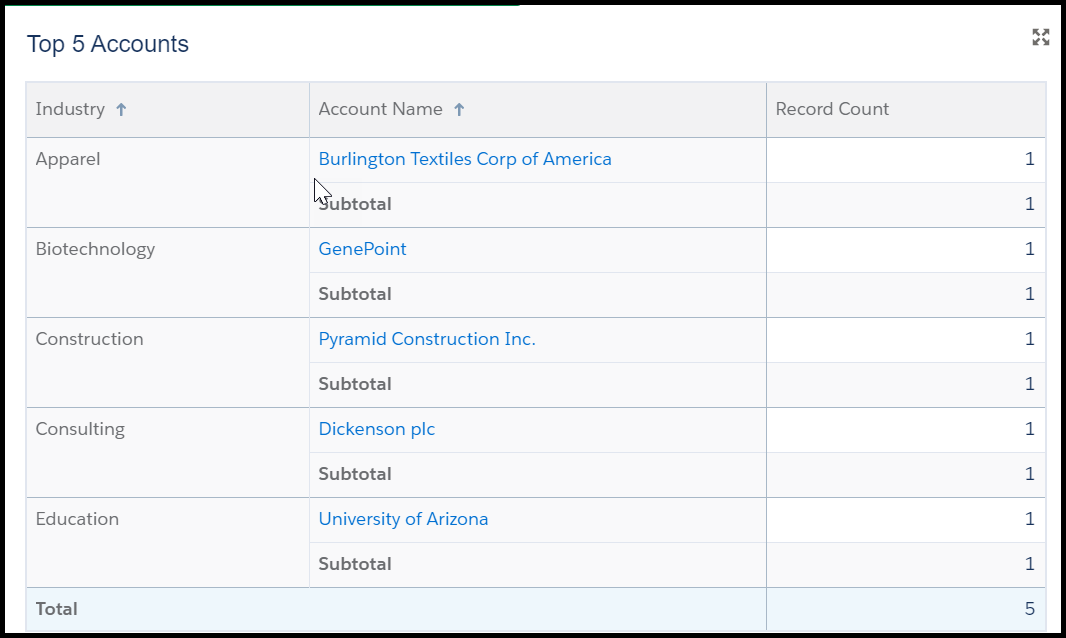
2) Use a Lightning Table - There are times when tabular data (basically a list or table) fits your needs sufficiently without requiring a visual such as a bar graph or gauge.  Tabular components are good for information such as “Top 5 Opportunities based on Revenue”, or “Top 10 Accounts in Danger of Terminating”. In Classic, the most you could do with tabular information was limit the number of results visible in your component, with a few adjustments available for the columns visible. While Classic does “meet your needs” with this, Lightning takes it a few steps further to make it more customizable. A Lightning Table allows you to show up to 200 records with 10 columns, group data with measures (such as sum, average, maximum, and minimum), and use a summary formula column.  Also, Lightning Tables support two groups and allow you to show subtotals on first level groupings. These are great features to take relatively flat data and make it easier to analyze! 
3) View who people view as - One of the most frustrating points of Classic Dashboards had to be the limited viewing capabilities. It wasn’t an uncommon issue for companies to have a templated dashboard that had to be customized for each Sales user, resulting in hundreds of dashboards over time.  This could create major issues for System Admins responsible for creating, updating, and retiring these dashboards, spending upwards of weeks depending on what needed to be done.  A Dynamic Dashboard puts an end to all of that hassle with the ability to choose who people view the dashboard as. Using permissions and sharing settings, one dashboard can be created for many users. This means there can be just two dashboards for the whole sales department (one for management, and one for sales reps). Not only does this save a ton of time for System Admins, but it also ensures that everyone is seeing the same components consistently over time. There are three options for “View Dashboard As”:
  • Me - people view the dashboard as you (but this is not recommended if you are a System Admin, as they will more than likely encounter permissions issues)
  • Another Person - you can choose someone else for viewers to see the dashboard as
  • The Dashboard Viewer - the data is seen as it pertains to the specific viewer
There is also a setting System Admins can select called “Let dashboard viewers choose whom they view the dashboard as”, but I would suggest using this with caution. If the user has the “View All Data” permission, this could potentially enable a representative to see sensitive data otherwise reserved for management. As a rule of thumb, make sure if you’re a System Admin, you test a few of these scenarios before releasing the dashboard to a public folder.
4) Themes & Color Palettes - One of the facets that makes Dynamic Dashboards so visually interesting is the use of the Light or Dark theme. This isn’t just a great way to save yourself from eye strain by using the Dark Theme; you can also select specific components to display in the opposite theme to highlight a particular section of your dashboard. Also, the color palettes are a great way to make your visuals more appealing, especially if you can find a palette complimentary to your brand or logo. It is worth noting that dashboard subscription emails do not display color palettes and themes, so make sure you try that out in case you receive any questions from your users.
 
5) Keyboard Shortcuts - Some of us are just more accustomed to keyboard navigation, and a computer mouse just slows us down. Well, now you can celebrate the use of keyboard shortcuts to edit your Dynamic Dashboards! A few of the shortcuts are pretty standard, like “Ctrl+Z” for “undo” and “Ctrl+S” for “save”, but you can also use the spacebar and arrows to change component size and “Ctrl+N” for a new component. Definitely take some time to try this out and see if it saves time creating your new dashboard!
If you need some practice for creating your Dynamic Dashboard, make sure to check out the Trailhead module  “Visualize your data with the Lightning Dashboard Builder”.   You can find this and other Trailhead modules to further your Lightning experience in my recent post “5 Lightning Trailhead Modules to Start Learning on Today”. 
Further Reading:
Build a Lightning Experience Dashboard
Edit Dashboards with Keyboard Shortcuts in Lightning Experience
Switch Between a 12 or 9-Column Dashboard Layout
Color Dashboard Data with Themes and Palettes
Show Tabular Information with a Lightning Table